Snoutput Labs
The experimental Lab where cyber-enhanced good boys build the software you didn't know you needed.
Sniff around ▸
Two builds inbound. Off the leash since 2026.

Real software, shipped by the pack. Click through to sniff around — overview, how it works, and the actual screens.

All your streams, sorted — movies, series, live TV and on-demand, beautifully organised on your Apple TV.
Open product ▸
Track your pensions, ISAs and savings in one place, and watch your net worth grow toward retirement — private, instant, and tax-free of complexity.
Open product ▸All your streams, sorted — movies, series, live TV and on-demand, beautifully organised on your Apple TV.
Import an M3U playlist or connect an Xtream / XUI panel. Paste a URL, upload a file, or load the bundled sample.
Every stream is parsed and sorted into Movies, Shows, Live TV and On Demand — with EPG guide data and de-duplication.
Browse, favourite, search and resume the whole library from a single beautiful home on your Apple TV.
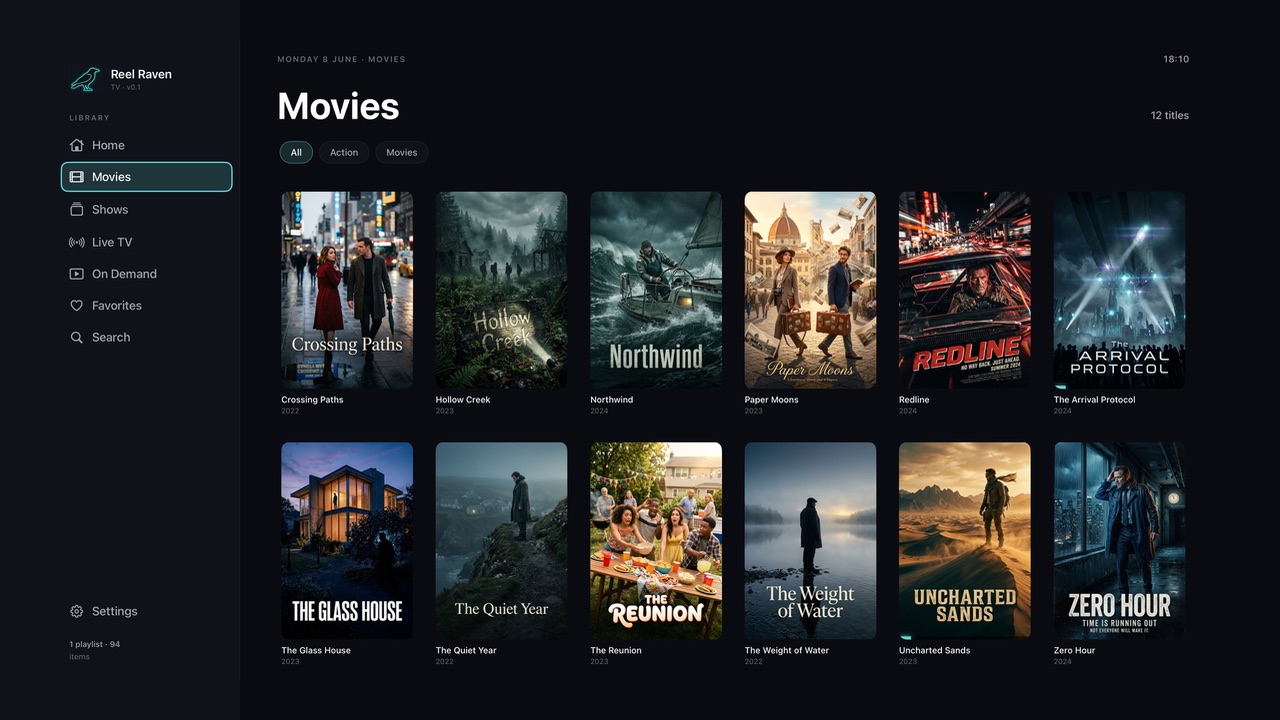
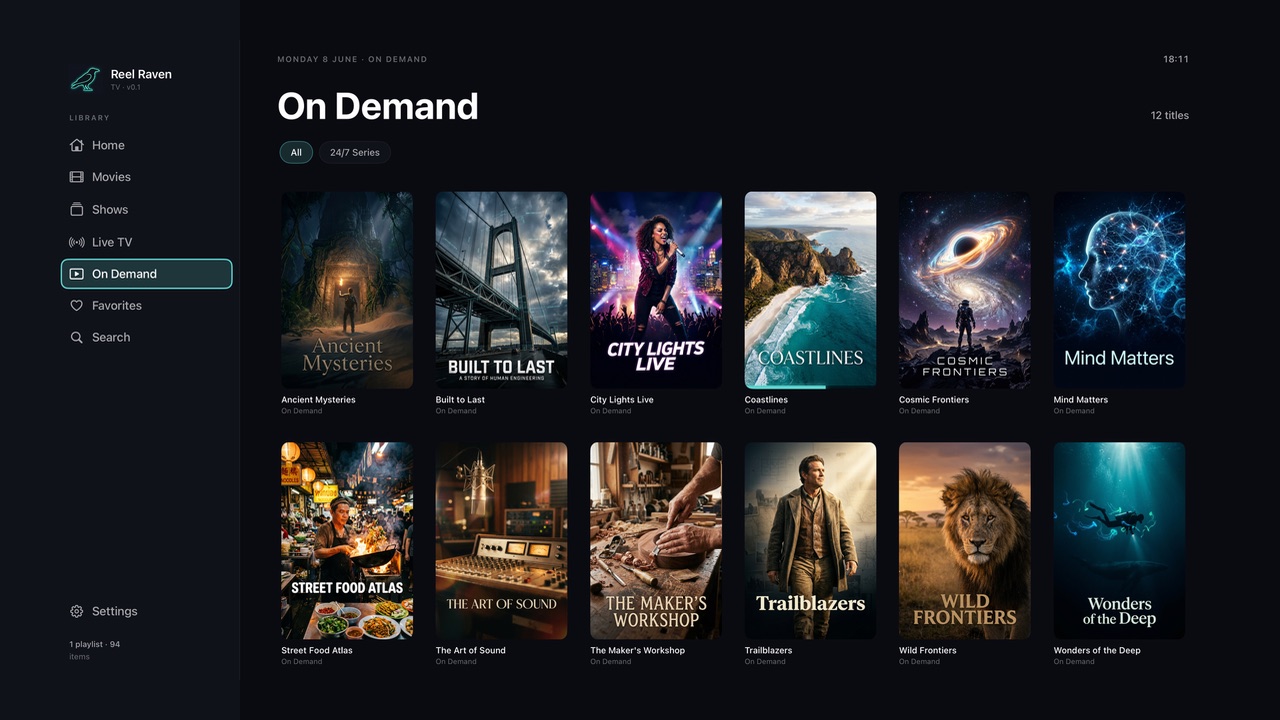
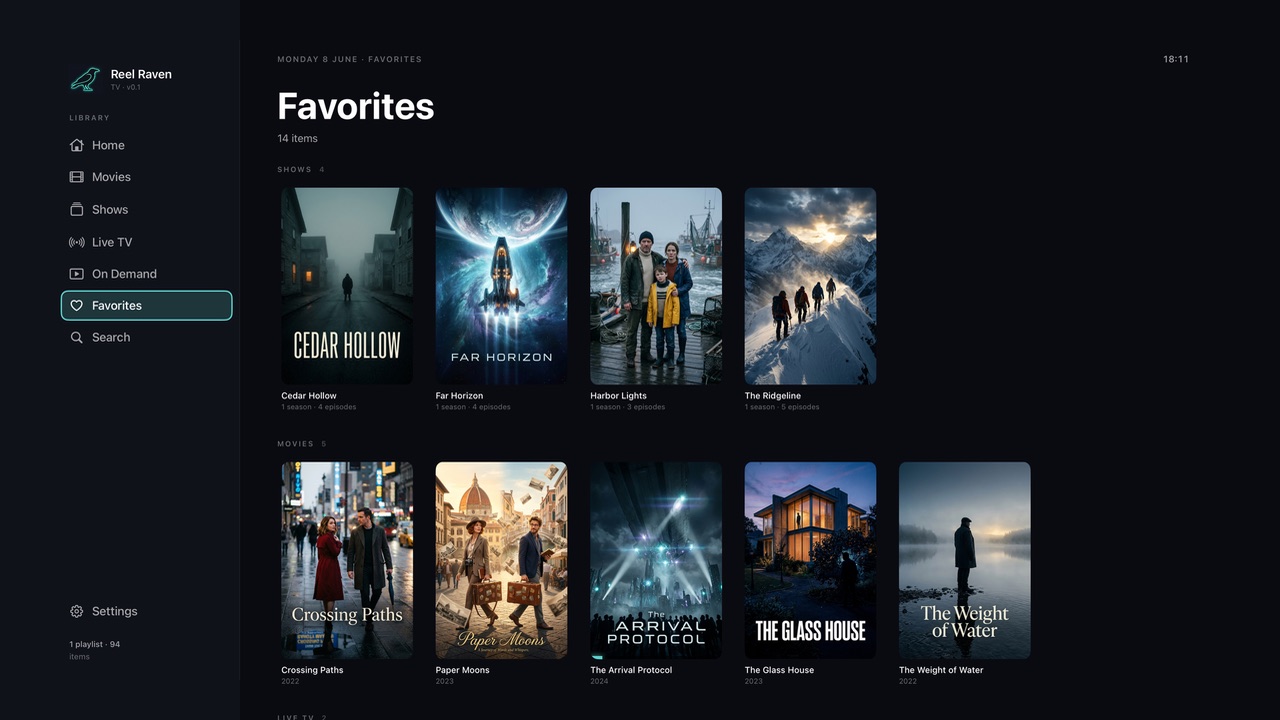
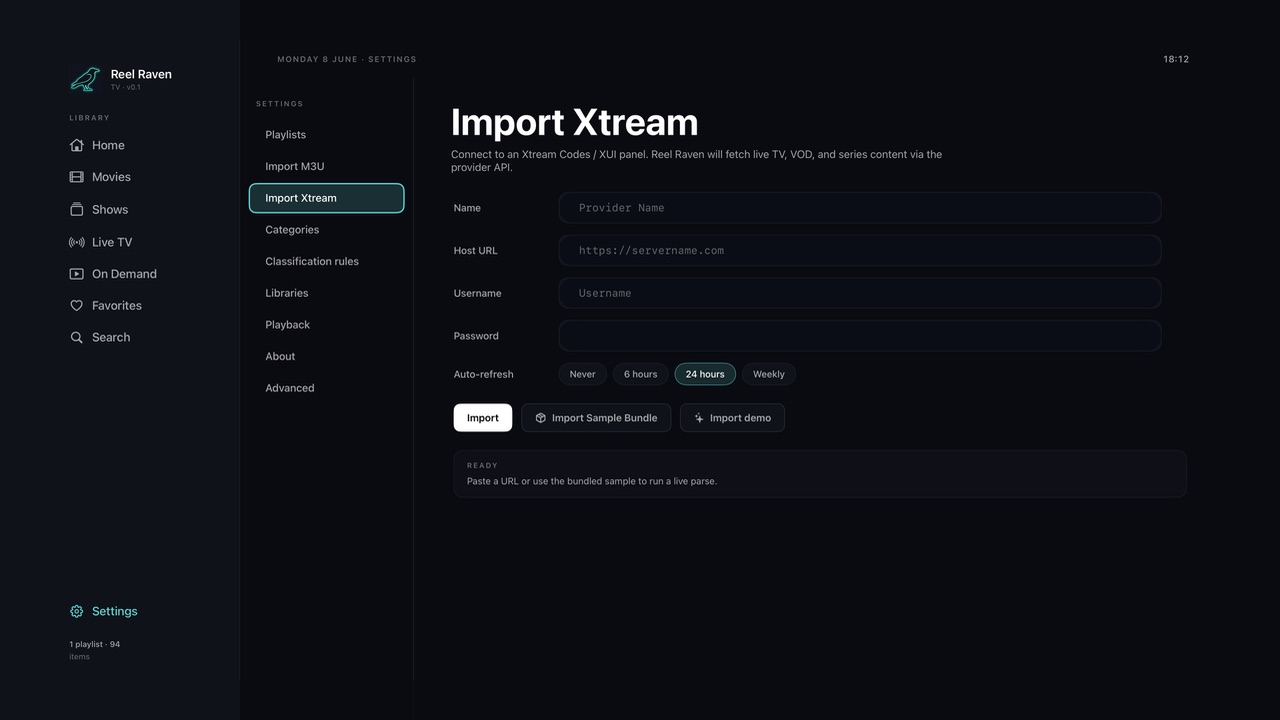
Real captures from ReelRaven on tvOS — the home, your libraries, the live guide and the player.




Setup & sources


ReelRaven pulls your channels and on-demand content from one or more playlists — an M3U link or an Xtream account — and organises everything into a single, tidy library: Movies, Shows, Live TV and On Demand, with Favorites and Search on top. This is the quick how-to for the things you'll actually do most often, using the standard Apple TV remote.
Everything in ReelRaven hangs off the menu down the left-hand side. Move the highlight with the remote's clickpad — swipe or press the edges — and open whatever is highlighted by pressing the centre. To step back out of a screen or stop playback, press the Back (Menu) button.
The left menu is always your home base: Home, Movies, Shows, Live TV, On Demand, Favorites and Search, with Settings tucked at the bottom.
Press and hold the centre button on any poster or tile to open a context menu. The options change with what you're pointing at — for example, adding something to Favorites. Whenever you want more actions on an item, the long-press is there.
Home is the first thing you see. A large featured title sits at the top with Resume and Favorited buttons, and below it are rows of content — Continue Watching for things you've started, and New & Notable for fresh additions. Scroll down through the rows and across each row to browse; select any tile to start watching.
These three sections all work the same way: a grid of cover art you can scroll through, with a count of how many titles are available and a set of filter chips along the top to narrow things down. Movies shows your film library — use the chips (such as All or Action) to filter by category. Shows is the same idea for series. On Demand collects catch-up and 24/7 content. Highlight a poster and press to begin; press Back to return to the grid.
Live TV opens the channel guide. Each channel appears as a tile with its logo, and the category filters along the top — Entertainment, Kids, Music, News, Sports — help you find the kind of channel you want. The bar across the bottom shows what's On Now on the highlighted channel, with the programme name and time. Select a channel to tune in.
Anything you mark as a favorite collects here, grouped by type — Shows, Movies and Live TV in their own sections — so your go-to content is one click away. You add items using the long-press context menu, or the Favorited button on a title's featured view.
Search lets you find anything across the whole library at once. Open Search, select the field, and type with the on-screen keyboard to look up movies, series or channels by name.
When you select a title or channel it goes straight to full-screen playback — there's no separate details page, pressing a title plays it. While something is playing, tap the clickpad to bring up the transport overlay: it shows the title and a progress bar with current and total time, and fades away on its own after a few seconds. Swipe left or right on the progress bar to scrub, and press Back to stop and return to where you were.
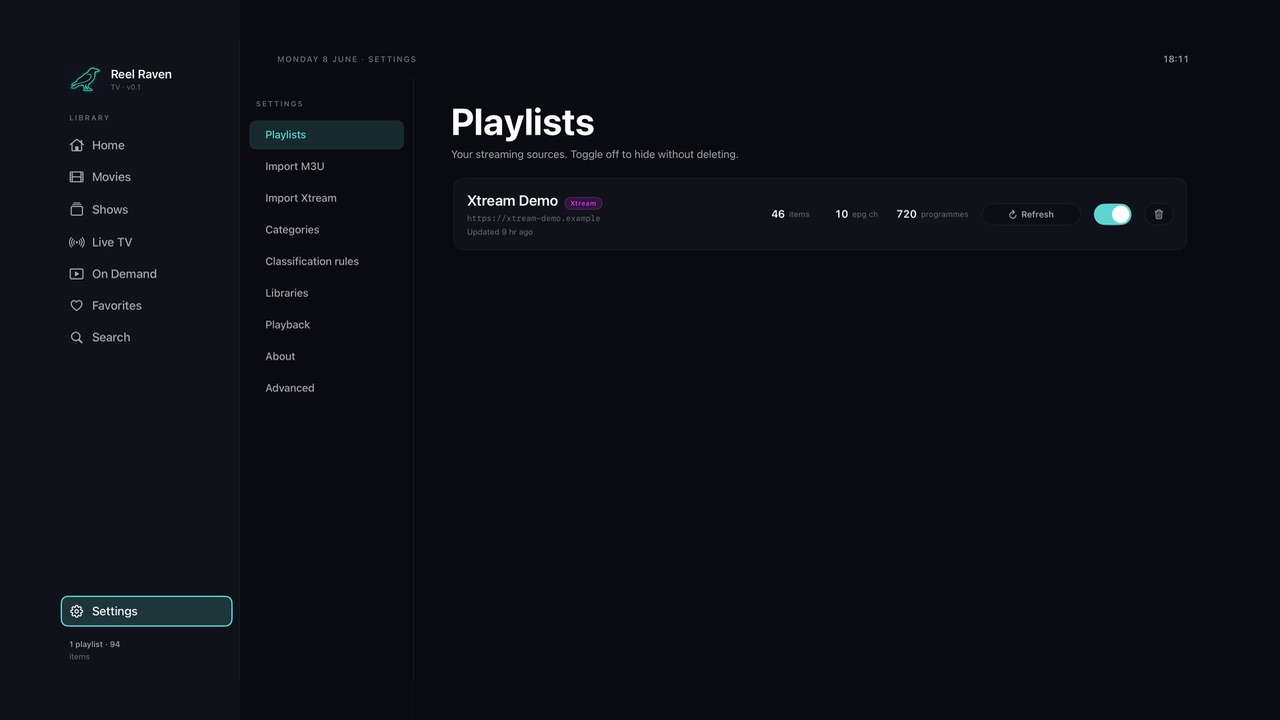
ReelRaven's library comes from playlists you add in Settings. Open Settings from the bottom of the left menu — it has its own sub-menu down the middle (Playlists, Import M3U, Import Xtream, and more). Playlists lists every source you've added, with how many items, channels and programme listings each one carries. Each source has a Refresh button to pull the latest content, a toggle to switch it on or off (hiding its content without deleting the source), and a delete control.
There are two ways to add a source:
Import M3U — paste a playlist link into the Playlist URL field, give it a name, and optionally add an EPG (XMLTV) link so the guide shows programme information. You can also upload an .m3u file directly or try the bundled sample. Set how often it should auto-refresh (Never, 6 hours, 24 hours or Weekly), then press Import.
Import Xtream — if your provider uses an Xtream Codes / XUI panel, choose this instead. Enter the Name, Host URL, Username and Password, pick an auto-refresh interval, and press Import. ReelRaven fetches the live TV, on-demand and series content through the provider's account.
When you import a playlist — especially an M3U feed — the items often arrive as one big flat list with only a category label to go on. Classification rules are how ReelRaven decides which section each item belongs in: Movies, Shows (Series), Live TV or On Demand.

Each rule is a simple “if it matches this, send it there.” On the left you choose what to match against — a Category or the item's name / title — and type the text to look for. Wildcards keep this flexible: Movie* matches anything that starts with “Movie”, and *Movies* matches anything that contains “Movies”. On the right you pick the destination library — the Pick… button lets you choose from your existing categories. The defaults show the idea: Movies* goes to Movies, TV* to Series, *24/7 Series* to On Demand, and Live*, UK* and USA* to Live TV.
Order matters here. Rules are checked from top to bottom and the first one that matches wins, so a more specific rule should sit above a broader one. Use the up and down arrows on each row to change a rule's priority, the ✕ to remove a rule, Add rule to create a new one, and Reset to defaults to start over.
The Season pattern at the top is a separate, more technical setting. It's a pattern — shown here as \bS(\d{1,2})\s?E(\d{1,3})\b, which matches text like “S01E03” — that ReelRaven uses to read season and episode numbers out of an item's title. This is what lets it group loose episodes into proper shows for M3U imports that can't carry structured show data of their own. The green Valid badge confirms the pattern is well-formed.
Changing these rules doesn't re-sort content you've already imported. To apply new rules, re-import the playlist from the Playlists tab.
Libraries controls how the tiles look in each section, which is useful when your content comes from different sources and the artwork isn't all the same shape. Each library — Home, Movies, Shows, Live TV, On Demand and Favorites — has its own switches, so you can set them independently.
Turning on Background gradient for a section places a soft, blurred gradient behind each tile. It's there to make artwork that's the wrong aspect ratio — too narrow, too wide, or letterboxed — sit more comfortably instead of floating on a flat background. This mostly helps with M3U feeds, where artwork tends to arrive in mixed sizes and shapes.
The Shows library has an extra switch, Portrait cards, which displays show box art as tall, poster-style cards instead of landscape tiles. Turn it on when your shows have portrait artwork and you'd rather see it at its natural shape.
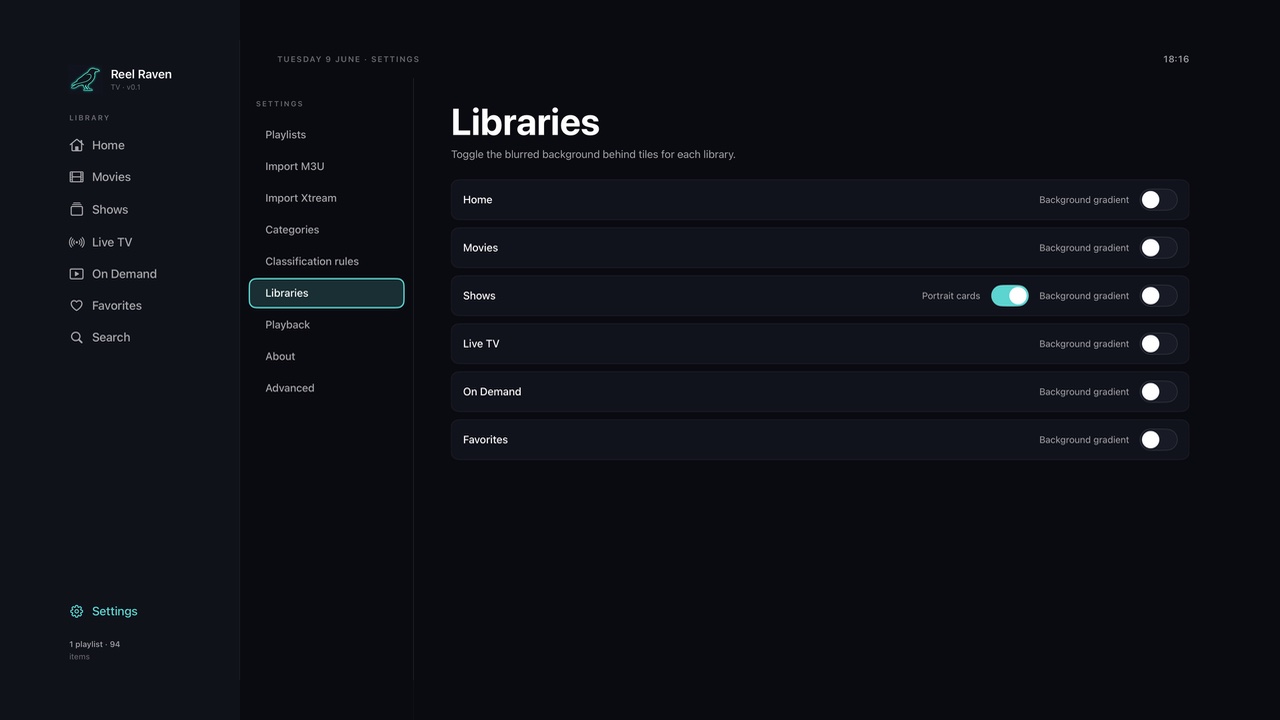
None of this changes your content — only how it's presented — so it's worth flipping the switches both ways and keeping whatever looks tidiest.
The rest of the Settings sub-menu fine-tunes how the app behaves. The main one to know is Playback, which holds global options applied to every stream — for example, a Subtitles switch to show embedded subtitle tracks during playback. The remaining items (Categories, About and Advanced) are for organising and troubleshooting your library; leave them at their defaults until you need them.
This Privacy Policy explains how ReelRaven (the “App”) handles information when you install or use it on an Apple TV. We have designed the App to operate without collecting or transmitting personal data about you. By using the App you confirm that you have read and understood this Policy.
In plain language:
The rest of this Policy gives the detail behind that summary.
We want to be explicit. The App does not collect:
To be useful, the App lets you enter information such as playlist URLs (M3U / M3U8 links), EPG / XMLTV URLs, playback and layout preferences, and any custom names you assign to a playlist or channel.
This information is stored locally on your Apple TV using standard tvOS storage. We do not receive a copy of it, and we do not transmit it to ourselves or to any third party. If you uninstall the App, this information is removed by tvOS in the normal way, and you can clear it at any time from within the App's settings.
If your Apple TV is signed in to an Apple Account with iCloud enabled, tvOS may back up app data as part of standard iCloud Backup. That process is controlled by you and Apple, under Apple's privacy policy — not by us.
The App is a player. When you tell it to load a playlist or play a stream, your Apple TV makes a direct network request to the server you have specified. That request typically includes information the server itself logs — your public IP address, a user-agent string, the URL you requested, and standard HTTP / HLS headers.
We do not receive, route, intercept or log these requests. They are between your device and the third-party server, and the privacy practices that apply to them are those of the server's operator, not ours. You should review the privacy policies of any third party whose content or service you access through the App.
We do not embed any third-party analytics, attribution, advertising or crash-reporting SDKs in the App.
If you have enabled “Share with App Developers” on your Apple TV, Apple may share aggregated, anonymised crash and performance data with us through its standard developer tools. This is provided by Apple, is not linked by us to your identity, and is used only to diagnose stability problems and improve the App. You can disable it at any time in Settings on your Apple TV.
The App is a general-purpose media player and is not directed to children. Because we do not collect personal data from anyone, we do not collect it from children either. Parents and guardians remain responsible for what playlists or streams are loaded into the App and should use tvOS parental controls as appropriate.
Although we do not hold personal data about you, applicable laws may give you rights, including under the EU / UK GDPR (access, rectification, erasure, restriction, objection, portability, and the right to complain to a supervisory authority), the California CCPA / CPRA, and equivalents elsewhere. We do not sell or share personal information.
Because we do not maintain personal data about you, we will normally have nothing to provide, correct or delete. If you wish to make a request, contact us using the details below.
Security. We do not maintain user databases, servers or back-end systems that store data about you, which substantially limits risk. The App relies on tvOS's built-in protections for anything you store locally; please keep your Apple TV up to date, and avoid entering sensitive third-party credentials into the App.
Changes. We may update this Policy from time to time. The “Last updated” date will always show the current version, and continued use of the App after a change takes effect constitutes acceptance.
Contact. Questions about this Policy or the App's privacy practices can be sent to:
These Terms and Conditions (the “Terms”) form a binding agreement between you and Licensor governing your installation and use of the ReelRaven app for Apple TV (the “App”). The App is licensed, not sold, to you. By downloading, installing or using the App you agree to these Terms. If you do not agree, do not use the App.
These Terms are supplemented by Apple's standard Licensed Application End User License Agreement (the “Apple Standard EULA”); where these Terms are silent, the Apple Standard EULA applies.
ReelRaven is a media player for Apple TV. It is designed to let you organise and play streams from playlist sources (for example, M3U / M3U8 URLs) that you supply yourself.
The App:
Any content you access through the App originates from third-party servers chosen by you. Licensor has no control over, and no responsibility for, that content or those servers.
The App is provided strictly for lawful personal use with content that you have the legal right to access. You are solely responsible for what you do with the App, including which playlists, URLs and streams you load into it.
You agree that you will not use the App to:
Licensor does not authorise, condone, endorse or facilitate any of the foregoing. The App is not designed for those purposes, and any such use is solely your responsibility and at your own risk.
You are solely responsible for any URL, playlist, EPG source or other content you enter into or use with the App, and you represent that you have all necessary rights and licences to use it and to access the underlying streams.
The App may interoperate with services, servers and content provided by third parties. Licensor does not own, control, monitor or endorse any of them and accepts no responsibility for them. Your use of any third-party service is solely between you and its operator, governed by that operator's terms and policies.
Subject to your compliance with these Terms and the Apple Standard EULA, Licensor grants you a limited, non-exclusive, non-transferable, revocable licence to download and use the App for your personal, non-commercial use on Apple-branded devices that you own or control, as permitted by the App Store Usage Rules.
You agree not to:
These restrictions do not apply to the VLCKit component, which is licensed under the GNU Lesser General Public License v2.1 (LGPL-2.1). As that licence permits, you may modify VLCKit for your own use, reverse engineer the App to the limited extent necessary to debug those modifications, and relink the App against a modified VLCKit — the object files and instructions are provided under Settings → About → Third Party in the App.
All rights not expressly granted to you are reserved by Licensor and its licensors.
The App does not collect personal data about you, and everything you enter into it stays on your device. How the App handles information is described in our Privacy Policy, which is incorporated into these Terms by reference. Please read it carefully.
To the maximum extent permitted by law, the App is provided “AS IS” and “AS AVAILABLE”, without warranty of any kind. Licensor disclaims all express, implied and statutory warranties, including merchantability, satisfactory quality, fitness for a particular purpose, accuracy and non-infringement.
Without limiting the above, Licensor does not warrant that the App will meet your requirements or operate uninterrupted or error-free, or that any third-party service or content accessible through the App will be available, accurate, lawful, complete or appropriate.
To the maximum extent permitted by law, Licensor will not be liable for any indirect, incidental, special, consequential, exemplary or punitive damages — including loss of profits, data, goodwill or use — arising out of or in connection with these Terms or your use of (or inability to use) the App, on any legal theory.
To the maximum extent permitted by law, Licensor's total cumulative liability will not exceed the greater of the amount you paid for the App in the twelve months before the claim arose, or ten US dollars (USD 10.00).
Nothing in these Terms excludes or limits any liability that cannot lawfully be excluded, including liability for fraud or wilful misconduct, or your non-excludable statutory rights as a consumer.
You acknowledge that these Terms are between you and Licensor only, not Apple Inc. (“Apple”), and that Apple is not responsible for the App or its content. Apple, not Licensor, is the seller of record for your purchase; refunds are administered by Apple via reportaproblem.apple.com.
For support or questions, contact support@snoutput-labs.com.
Governing law. These Terms are governed by the laws of England and Wales and, subject to any non-waivable rights under the law of your country of residence, the courts of England and Wales will have exclusive jurisdiction over any dispute.
Changes. Licensor may update these Terms from time to time. The “Last updated” date reflects the current version, and continued use of the App after changes take effect constitutes acceptance. If you do not agree, stop using and uninstall the App.
Termination. You may end these Terms at any time by deleting the App. Licensor may suspend or terminate your licence if you breach these Terms — in particular the acceptable-use rules above. Sections that by their nature should survive termination will survive.
Contact. Questions about these Terms may be sent to support@snoutput-labs.com or to Snoutput Labs.
These Terms are provided for general information only and do not constitute legal advice.
Track your pensions, ISAs and savings in one place, and watch your net worth grow toward retirement — private, instant, and tax-free of complexity.
Enter your pensions, ISAs and savings manually — workplace pensions, SIPPs, stocks & shares, and cash accounts all in one place.
WealthTide models growth to your target retirement age and translates the number into real-world terms — lifestyle tiers, tax-free lump sums, makeup by account.
The Pension tab tracks your annual allowance and carry-forward headroom, so you always know how much more you can pay in this tax year.
Four tabs — Plan, Accounts, Pension, Settings — each a full screen of useful numbers.

WealthTide pulls your pensions, ISAs and savings together in one place, projects what they could grow into by retirement, and translates that number into something tangible. This is a quick walkthrough of all four tabs.
Plan is the home tab and the heart of the app. At the top is the headline figure: your projected wealth at retirement — everything below unpacks what that means.
The Lifestyle card gamifies your progress. It shows which tier your projected wealth reaches (out of 30) and puts a real-world price tag on it — a luxury yacht, a country estate — along with how much more you'd need to hit the next tier.
Below that, the Wealth Projection chart plots your pensions, ISAs and cash growing from today to retirement age. Drag across it to explore the value at any age. Scroll further to reach the Tax-Free Lump Sum tool: a slider lets you choose what percentage of your pension to take tax-free (up to 25%), and the app shows the resulting amount and the age it becomes available.
Finally, Makeup breaks your projected pot down account by account, so you can see exactly where the money comes from.
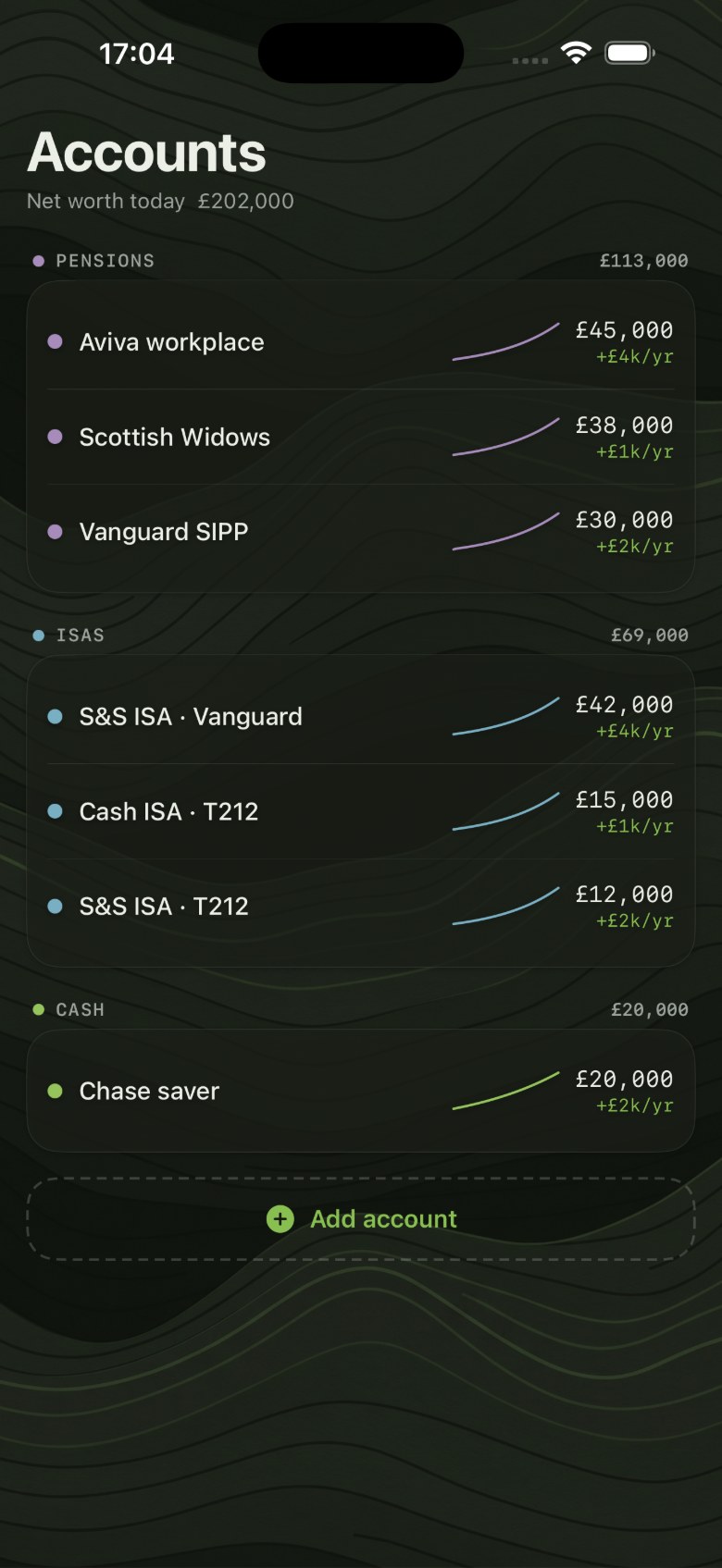
The Accounts tab is your net-worth dashboard. The total at the top sums everything you hold today, and the accounts below are grouped by type — Pensions, ISAs and Cash — with a subtotal for each group.
Every account shows its current value, a small trend line, and its recent growth rate (for example, +£4k/yr), so you can see at a glance what's pulling its weight.
Use Add account at the bottom to bring another pension, ISA or savings account into the picture. The more you add, the more complete your projection becomes — and the more accurate the Plan tab's headline figure will be.
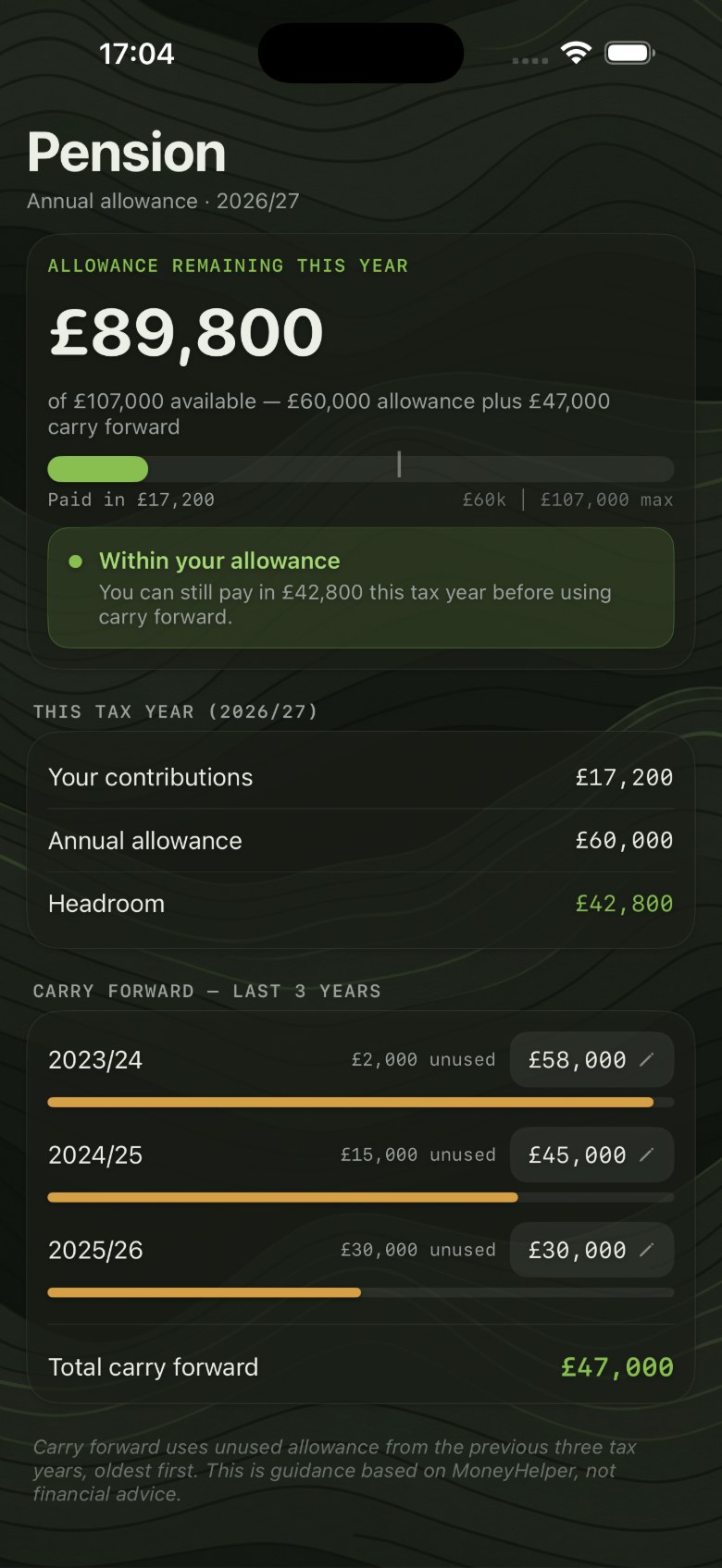
The Pension tab helps you stay inside your annual allowance — the limit on how much you can contribute to your pensions each tax year while still getting tax relief.
The headline shows the allowance remaining this year, made up of the standard annual allowance plus any unused allowance carried forward from previous years, with a bar showing how much you've already paid in.
The This Tax Year section lays out the maths plainly: your contributions so far, your annual allowance, and the resulting headroom still available.
Below it, Carry Forward lists the unused allowance from the last three tax years — tap to adjust each figure — and totals it up. Carry forward uses your oldest unused allowance first. As the app notes, the guidance here is based on MoneyHelper, not personal financial advice.
Settings is where you tune the assumptions that drive every projection. Under Plan you set your salary, your current age, and the age you plan to retire — change these and the numbers throughout the app update to match.
Appearance switches between light and dark themes.
Under Data, Demo data loads a sample portfolio so you can explore the app straight away without entering your own figures. Reset clears everything to start fresh. The Legal section links to Terms & Conditions and Privacy Policy.
WealthTide is a planning tool, not financial advice. All projections are estimates — useful for picturing your options, not for making investment decisions.
This Privacy Policy explains how WealthTide (the “App”) handles information. We have designed the App to work entirely on your device, without collecting or transmitting personal data about you. By using the App you confirm that you have read and understood this Policy.
In plain language:
The rest of this Policy gives the detail behind that summary.
We want to be explicit. The App does not collect:
To be useful, the App lets you enter information such as your salary, account balances, pension and savings contributions, ages, and any custom labels you choose.
This information is stored locally on your device using standard iOS storage. We do not receive it, and we do not transmit it to ourselves or to any third party. If you delete the App, this information is removed by iOS in the normal way, and you can clear it at any time from within the App.
If you use iCloud Backup, iOS may include the App's data in your device backup. That process is controlled by you and Apple, under Apple's privacy policy — not by us.
We do not embed any third-party analytics, attribution, advertising or crash-reporting SDKs in the App.
If you have enabled “Share with App Developers” on your device, Apple may share aggregated, anonymised crash and performance data with us through its standard developer tools. This is provided by Apple, is not linked by us to your identity, and is used only to diagnose problems and improve the App. You can disable it at any time in your device Settings.
The App is intended for adults planning their own finances. It is not directed to children, and because we do not collect personal data from anyone, we do not collect it from children.
Although we do not hold personal data about you, applicable laws may give you rights, including under the EU / UK GDPR (access, rectification, erasure, restriction, objection, portability, and the right to complain to a supervisory authority), the California CCPA / CPRA, and equivalents elsewhere. We do not sell or share personal information.
Because we do not maintain personal data about you, we will normally have nothing to provide, correct or delete. If you wish to make a request, contact us using the details below.
Security. We do not maintain user databases, servers or back-end systems that store data about you, which substantially limits risk. The App relies on your device's built-in protections; please keep your device up to date.
Changes. We may update this Policy from time to time. The “Last updated” date will always show the current version, and continued use of the App after a change takes effect constitutes acceptance.
Contact. Questions about this Policy or the App's privacy practices can be sent to:
These Terms and Conditions (the “Terms”) form a binding agreement between you and Licensor governing your use of the WealthTide app (the “App”). By downloading, installing or using the App you agree to these Terms. If you do not agree, do not use the App.
These Terms are supplemented by Apple's standard Licensed Application End User License Agreement (the “Apple Standard EULA”); where these Terms are silent, the Apple Standard EULA applies.
WealthTide is a personal wealth and retirement planning illustration tool. It helps you visualise how the savings, pensions and contributions you enter yourself might grow over time under simple assumptions.
WealthTide is not a regulated financial product or service. It is not a bank, broker, adviser, pension provider or platform, and it does not hold, manage, move or invest any money.
Nothing in the App is financial, investment, tax, pension, retirement or legal advice, and nothing in it is a personal recommendation. The App does not take account of your individual circumstances, objectives or attitude to risk.
WealthTide and Snoutput Labs are not authorised or regulated by the Financial Conduct Authority (FCA) and do not carry out any regulated activity or provide regulated advice.
Before making any financial, investment, pension or tax decision you should obtain independent advice from a suitably qualified professional who is authorised and regulated in your jurisdiction. Any action you take on the basis of the App is taken entirely at your own risk.
Every figure the App produces is an illustration — not a forecast, guarantee or promise. Figures are generated from the inputs you provide and from simplified assumptions, for example constant annual growth rates and regular contributions that in reality will not hold.
In particular:
You accept that the App's illustrations are for general information and planning visualisation only.
Everything you enter into the App stays on your device. How the App handles information is described in our Privacy Policy, which is incorporated into these Terms by reference. Please read it carefully.
Subject to your compliance with these Terms and the Apple Standard EULA, Licensor grants you a limited, non-exclusive, non-transferable, revocable licence to download and use the App for your personal, non-commercial use on Apple-branded devices that you own or control.
You agree not to:
All rights not expressly granted to you are reserved by Licensor.
To the maximum extent permitted by law, the App is provided “AS IS” and “AS AVAILABLE”, without warranty of any kind. Licensor disclaims all express, implied and statutory warranties, including merchantability, satisfactory quality, fitness for a particular purpose, accuracy and non-infringement.
Without limiting the above, Licensor does not warrant that the App will meet your requirements or operate uninterrupted or error-free, or that any projection, calculation or figure it produces is accurate, complete, or suitable for your circumstances.
To the maximum extent permitted by law, Licensor will not be liable for any indirect, incidental, special or consequential loss, or for any financial loss, lost profit, lost savings or other loss arising from any decision you make, or decline to make, in reliance on the App or its illustrations.
Nothing in these Terms excludes or limits any liability that cannot lawfully be excluded, including liability for fraud, for death or personal injury caused by negligence, or your non-excludable statutory rights as a consumer.
You acknowledge that these Terms are between you and Licensor only, not Apple Inc. (“Apple”), and that Apple is not responsible for the App or its content.
For support or questions, contact support@snoutput-labs.com.
Governing law. These Terms are governed by the laws of England and Wales and, subject to any non-waivable rights under the law of your country of residence, the courts of England and Wales will have exclusive jurisdiction over any dispute.
Changes. Licensor may update these Terms from time to time. The “Last updated” date reflects the current version, and continued use of the App after changes take effect constitutes acceptance. If you do not agree, stop using and uninstall the App.
Termination. You may end these Terms at any time by deleting the App. Sections that by their nature should survive termination will survive.
Contact. Questions about these Terms may be sent to support@snoutput-labs.com or to Snoutput Labs.
These Terms are provided for general information only and do not constitute legal advice.
Snoutput Labs is a tiny, independent studio — one human, a few very good boys — building small, sharp consumer software end to end. The cyber-Labradors are a bit. The shipping is real.
Behind the pack is a principal-level software engineer with more than 25 years building and shipping production software — from enterprise platforms relied on by large organisations to consumer websites, payment and fraud systems, and public-sector services. The kind of work that runs in production for years, not just a demo.
Over that time the work has spanned the full arc: leading solution design and architecture, managing engineering teams, and steering big platform modernisations — including the move from on-premises software to elastically-scalable, multi-tenant cloud services. Comfortable across the stack, and increasingly leaning on AI wherever it genuinely speeds the work up.
Snoutput Labs is where all of that gets pointed at its own ideas: focused apps, designed and built end to end by the same hands, then sent out the door. No committee, no roadmap theatre — just useful things, shipped.
Big labs ship features. We ship the whole dog — designed, built and finished by the same hands, then let off the leash.
— THE PACKFocused apps that do one thing well beat sprawling suites that do everything badly.
Designed, built, and shipped by the same hands — so nothing gets lost in the handoff.
Opinionated and quick. We'd rather ship a sharp v1 than perfect a deck about it.